
BlueDisk Recovery Tool

Filesystem parsing · Residual carving · Encrypted volume detection

v1.1.0 Current Released Nov 10, 2026 Releases 2

Download

v1.1.0 Current Released Nov 10, 2026 · —

Choose a download channel

Before you download

  • Portable build — unzip and run the main executable. No installation required.
  • Run as administrator on first launch (raw physical disk access is required).
  • BlueDisk Home (disk manager) and BlueDisk Recovery ship in the same archive — downloading either product includes both tools. Extract the archive completely before running.
  • Clicking a channel opens a third-party cloud drive. This site stores no installer files and does not proxy downloads.

Overview

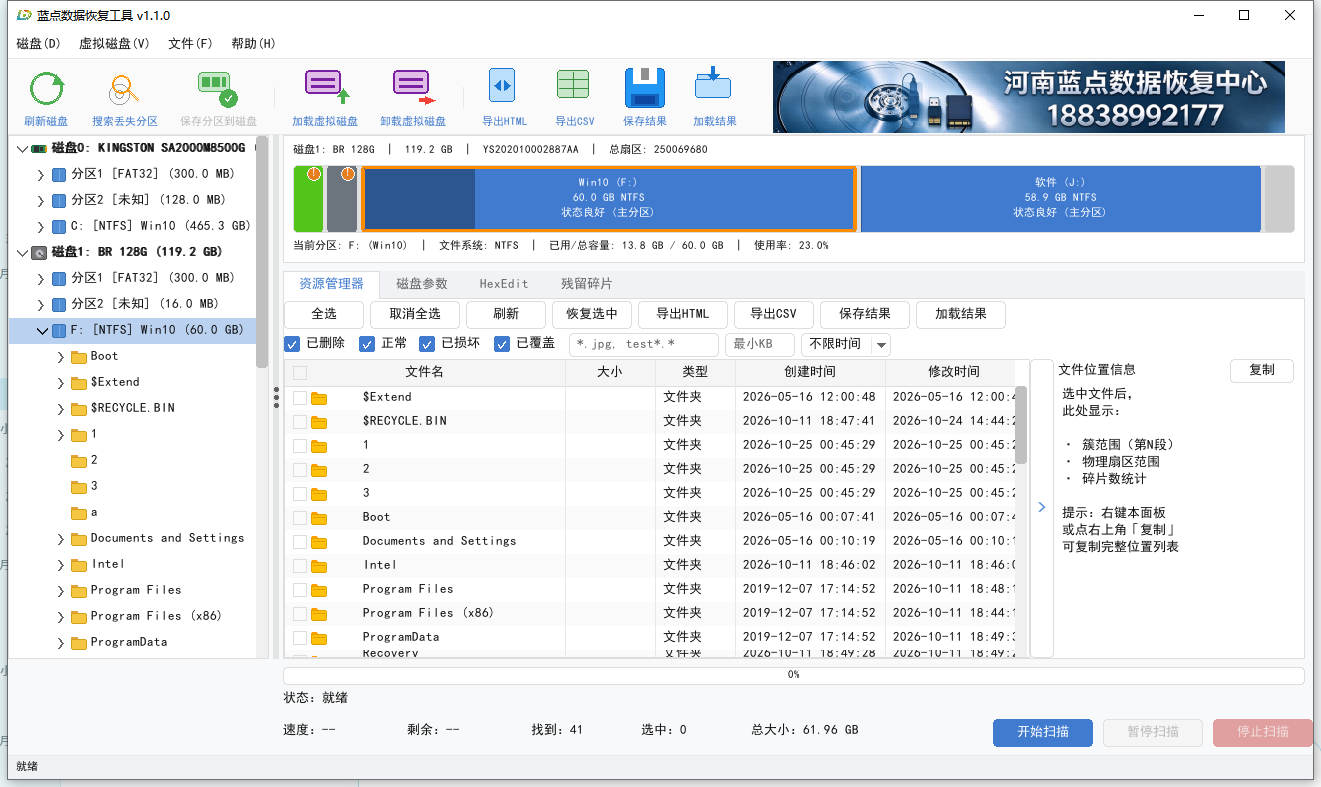
A professional-grade data recovery tool built for real-world corruption: lost partitions, damaged filesystems, accidental deletion, and residual data after formatting. A file-explorer view browses deleted and residual files directly, filterable by state (deleted / normal / damaged / overwritten), type, and size; Residual-fragment carving recovers photos and other common types by file content; Scan results can be saved and reloaded, exported to HTML / CSV, with HexEdit and disk-parameter views for low-level verification; Supports NTFS / FAT / exFAT filesystems and detects BitLocker / VeraCrypt / LUKS encrypted volumes.

Screenshots

Main window: disk scan and result browsing

Release history

Newest first.

v1.1.0

Current Nov 10, 2026
  • New features Branding capability: the product name and banner can be replaced via configuration for OEM builds
  • Bug fixes Renewal stacking: buying another monthly or yearly license while one is still active now extends from the existing expiry date instead of overwriting it
  • Bug fixes Fixed lifetime licenses occasionally being superseded by time-limited ones, which showed an expiry date incorrectly
  • Improvements The activation code box now wraps long codes instead of squeezing them onto one line

2 more

v1.0.0

Sep 19, 2026
  • New features Scan and recover common filesystems: NTFS / FAT16 / FAT32 / exFAT / Ext2-4
  • New features Four-layer recovery strategy: scope discovery, filesystem structure recovery, metadata carving and content signature carving, with results merged and de-duplicated
  • New features Recovers even with a damaged boot sector: automatically falls back to in-family scanning instead of degrading to signature carving only
  • New features Deleted file recovery: scans subdirectories recursively and preserves original names, paths and timestamps wherever possible

10 more